Or: How Context-Driven Protocols Became the Backbone of Smarter Development and AI Tools
Grab your favorite coffee (or tea, or energy drink—no judgment here) and settle in, because we’re about to explore why some APIs feel like they “get” you, while others just spit out data. The secret is context—and the Model Context Protocol (MCP) is all about making your backend, dev tools, and even AI assistants context-aware. In this series, we’ll look at how MCP came to be, why it matters, and how it’s shaping the future of development and LLM-powered workflows.
What is MCP? (And Why Should You Care?)
Let’s start simple: MCP stands for Model Context Protocol. It’s an open standard that enables seamless integration between LLM applications and external data sources and tools. Unlike traditional network protocols like HTTP or WebSocket, MCP is specifically designed for AI applications—providing a standardized way to connect language models with the context they need from external systems. Think of it like a USB-C port for AI applications: just as USB-C provides a standardized way to connect devices, MCP provides a standardized way to connect AI applications to external systems.
The Model Context Protocol (MCP) was introduced by Anthropic in late 2024 as an open standard for connecting AI applications to external data sources, tools, and workflows.
Why does this matter?
- Context makes APIs smarter and more adaptive
- It enables workflows, automation, and personalized experiences
- It’s the foundation for modern dev tools and LLM-powered assistants
How MCP Differs from REST, GraphQL, and RPC
Let’s break it down with a practical scenario:
- REST: Stateless, resource-based, great for CRUD. You GET, POST, PUT, DELETE resources, but each request is isolated.
- GraphQL: Flexible queries, but still mostly stateless. You ask for exactly the data you want, but the server doesn’t know your workflow.
- RPC: Remote procedure calls, but context is manual. You call functions on the server, but you have to pass context yourself.
- MCP: Designed specifically for AI applications. Uses JSON-RPC 2.0 to enable LLMs to discover and invoke tools, access resources, and maintain context across interactions.
MCP doesn’t replace REST, GraphQL, or RPC—it complements them by providing a standardized way for AI applications to interact with external systems that may use any of these protocols internally.
Example:
A REST API might let you POST a document. An MCP API lets you POST a document *as part of a workflow*, with user, session, and next-step context included. The server can then guide you to the next step, validate permissions, and adapt the response based on your role and history.
The Human Side: Why Context Feels Good and is Critical for Modern Development
Let’s get real: Users expect software to “just know” what they need. Editors want to see only their stories, developers want code suggestions that fit their project, and AI assistants need to understand the current task.
Imagine walking into your favorite coffee shop. The barista greets you by name, remembers your usual order, and asks if you want to try the new seasonal blend. That’s context in action. Now imagine an API that can do the same—knows your role, your workflow, and what you’re likely to do next.
Context enables:
- Personalized UIs and workflows
- Smarter automation (think: multi-step approvals)
- Adaptive dev tools (like VS Code extensions that know your project)
- LLMs that give relevant, actionable answers
It’s not just about data—it’s about understanding, anticipation, and smooth workflows that make software feel intuitive and responsive.
How MCP Works Under the Hood
MCP follows a client-server architecture built on JSON-RPC 2.0, where an **MCP Host** (like Claude Desktop or VS Code) creates **MCP Clients** to connect to **MCP Servers** that provide external functionality to AI applications.
Here’s how it works:
- Initialization & Capability Negotiation: Client and server establish connection and negotiate supported features
- Discovery: Client discovers available tools, resources, and prompts from the server
- Execution: AI application invokes tools or requests resources as needed
- Real-time Updates: Server can notify client of changes via notifications
MCP’s Three Core Primitives:
- Tools: Executable functions that AI applications can invoke (e.g., file operations, API calls, database queries)
- Resources: Data sources that provide contextual information (e.g., file contents, database records, API responses)
- Prompts: Reusable templates that help structure LLM interactions (e.g., system prompts, few-shot examples)
Key Technical Features:
- JSON-RPC 2.0 Foundation: Standardized message format and request/response handling
- Transport Layer: Supports stdio (local processes) and HTTP (remote servers)
- Capability Negotiation: Ensures client and server compatibility during initialization
- Real-time Notifications: Enables dynamic updates when server capabilities change
Sample MCP Tool Call Request (JSON-RPC 2.0):
{
  "jsonrpc": "2.0",
  "id": 1,
  "method": "tools/call",
  "params": {
    "name": "submitStory",
    "arguments": {
      "title": "Breaking News!",
      "body": "Something big happened...",
      "userId": "editor-123",
      "workflow": "storySubmission"
    }
  }
}Sample MCP Tool Call Response:
{
  "jsonrpc": "2.0",
  "id": 1,
  "result": {
    "content": [
      {
        "type": "text",
        "text": "Story submitted successfully. Forwarded to editor for approval. Story ID: story-456"
      }
    ]
  }
}Sample MCP Initialization Request:
{
  "jsonrpc": "2.0",
  "id": 1,
  "method": "initialize",
  "params": {
    "protocolVersion": "2025-06-18",
    "capabilities": {},
    "clientInfo": {
      "name": "Claude Desktop",
      "version": "1.0.0"
    }
  }
}Example: MCP Server Configuration for a Dev Tool:
# MCP server configuration
mcp_servers:
  code_assistant:
    command: "node"
    args: ["code-assistant-server.js"]
    capabilities:
      tools:
        - name: "refactorCode"
          description: "Extract functions and refactor code"
        - name: "analyzeProject"
          description: "Analyze project structure and dependencies"
      resources:
        - name: "projectFiles"
description: "Access to project file contents"MCP in Action: Real-World Scenarios
AI-Powered Development Tools
Claude Desktop uses MCP to connect to your filesystem, enabling it to read project files, understand your codebase structure, and provide context-aware code suggestions. The MCP server exposes tools for file operations and resources for project context.
Integrated AI Assistants
A VS Code extension uses MCP to provide an AI assistant with access to your project’s database schema, API endpoints, and current file context. The LLM can then generate database queries, API calls, and code that fits your specific project structure.
Data Analysis Workflows
An AI application connects to multiple MCP servers (databases, spreadsheets, APIs) to gather data, perform analysis, and generate reports. Each server exposes tools for querying and resources for accessing data, while the AI orchestrates the complete workflow.
Customer Support Automation
An AI customer service agent uses MCP to access customer databases, order tracking systems, and knowledge bases. When a customer asks about their order, the AI can invoke MCP tools to look up order status, check shipping details, and provide real-time updates.
Visualizing MCP: Architecture Overview
Here’s a simplified diagram showing how MCP connects AI applications to external systems:
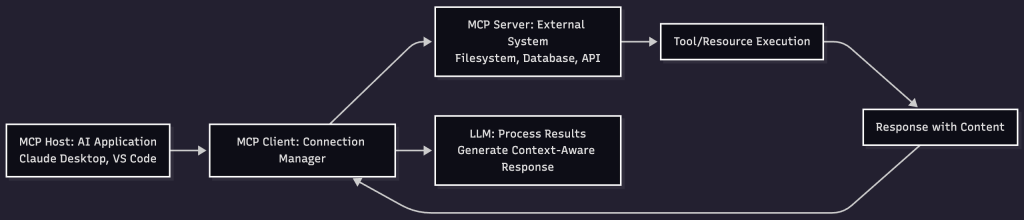
The MCP Host manages multiple clients, each connected to different servers, enabling the AI to access diverse external capabilities seamlessly.
Q&A: Common Questions About MCP
Q: Is MCP just for big enterprises?
A: Not at all! MCP is useful for any app that needs workflows, automation, or smarter APIs. Startups, dev tools, and AI projects all benefit from context-driven design.
Q: Does MCP replace REST or GraphQL?
A: No—it complements them. You can build MCP on top of REST or GraphQL, or use it as a protocol for specific workflows.
Q: How do I start with MCP in my project?
A: Start by identifying external systems your AI application needs to access—databases, APIs, file systems, etc. Build MCP servers that expose tools and resources for these systems, or use existing MCP servers from the community. Check out the official MCP SDKs in Python, TypeScript, and other languages.
Q: What about security?
A: MCP includes built-in security through capability negotiation, transport-level authentication (bearer tokens, API keys), and controlled access to tools and resources. Always validate permissions in your MCP servers and use secure transport mechanisms like HTTPS for remote servers.
Anti-Patterns to Avoid
- Global context variables: Don’t rely on global state—pass context explicitly.
- Monolithic command handlers: Break commands into small, testable units.
- Ignoring context updates: Always return updated context in responses.
- Lack of documentation: Document your context model and command specs for maintainability.
MCP for Teams: Collaboration and Scaling
When multiple teams work on a platform, MCP helps keep everyone aligned. By standardizing context and command formats, you avoid confusion and make it easier to onboard new developers, integrate new features, and scale workflows.
- Use shared context schemas
- Version your commands and context
- Automate testing for context transitions
- Encourage feedback and iteration
Looking Ahead: MCP and the Next Generation of Software
As AI and automation become more central to development, MCP will play a bigger role. Imagine:
- LLMs that can refactor code based on your project’s history
- Dev tools that automate onboarding for new team members
- Business apps that adapt workflows in real time
MCP is the protocol that makes these dreams possible—by putting context at the heart of every interaction.
Final Thoughts: Why You Should Care (Even If You’re Not an AI Dev)
Whether you’re building a dashboard, a dev tool, or an AI assistant, context is the key to smarter, more adaptive software. MCP gives you the tools to design APIs and workflows that feel intuitive, responsive, and future-proof.
By embracing MCP, you’re not just building tools—you’re creating collaborators that understand your needs, anticipate your next move, and make your work smoother and more productive.
Up Next: In Part 2, we’ll dive into how MCP powers LLMs, VS Code extensions, and modern dev environments. You’ll see real-world examples, current protocols, and how context is changing the way we code.
Ready to make your APIs and tools smarter? Stay tuned for Part 2!